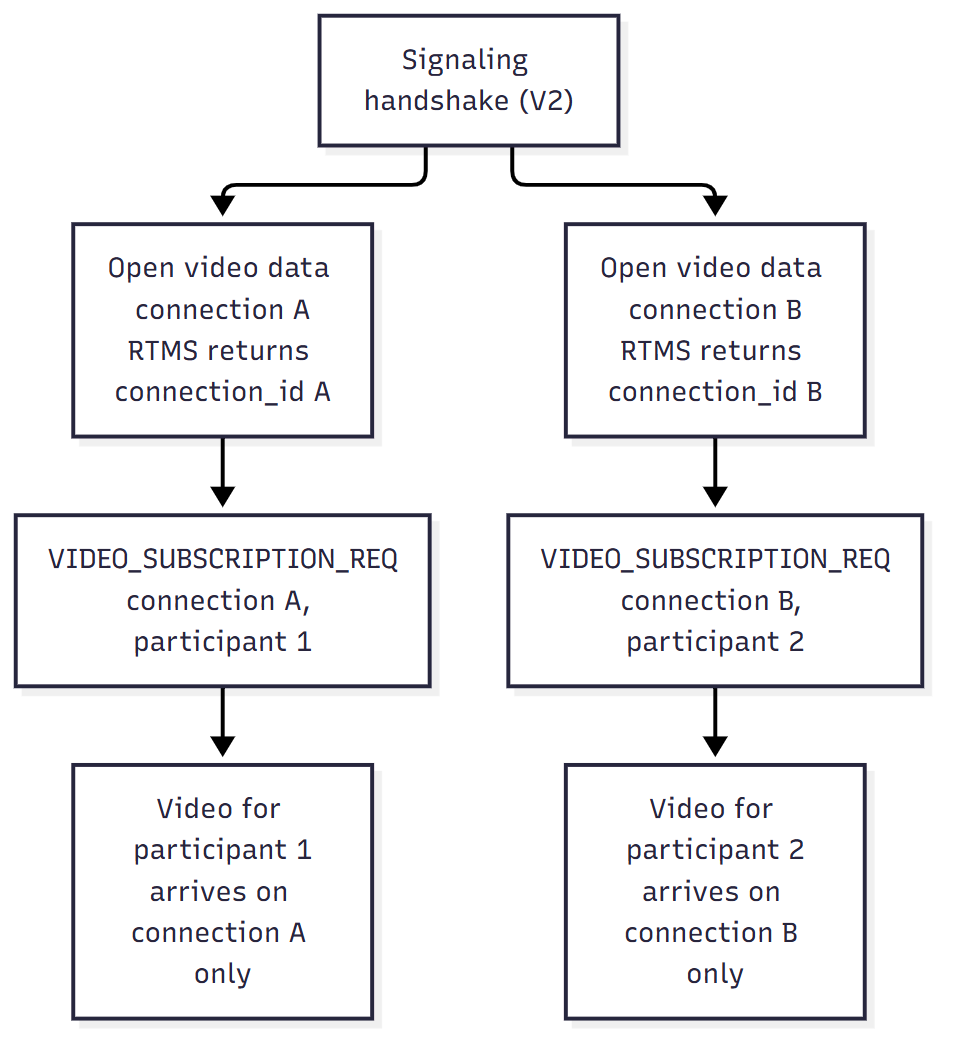
To receive video from several participants at the same time, open one video data connection for each participant, then bind each connection to a participant over the signaling connection. RTMS delivers each participant's video only on the connection that is bound to them.
RTMS assigns each video data connection a connection_id when the connection opens. You use this ID to subscribe, unsubscribe, and match responses to connections.
Prerequisites
Before you begin, make sure that:
- You completed a successful signaling handshake with
protocol_versionof2or later. For more information, see Working with streams. - Multiple video subscriptions are enabled for your account.
- You use the same message encoding as the signaling connection, either JSON text frames or protobuf
RtmsMessageframes.
The data handshake does not include a participant user_id, so you open one video data connection for each participant you want to subscribe to. To get a participant's user_id, use the participant events in session events.
The following diagram shows the flow for two participants.
Step 1: Open a video data connection
To open a video data connection, send a data handshake request (msg_type: 3) with media_type: 2 for video, and set data_opt to 6 (VIDEO_MULTI_INDIVIDUAL_STREAM) in the video media parameters. Do not send user_id or connection_id in this request. RTMS creates the connection identity and returns it in the response.
Send the following data handshake request.
{
    "msg_type": 3,
    "protocol_version": 2,
    "rtms_stream_id": "stream-123",
    "signature": "<signature>",
    "media_type": 2,
    "sequence": 201,
    "media_params": {
        "video": {
            "content_type": 1,
            "codec": 7,
            "resolution": 2,
            "fps": 15,
            "data_opt": 6
        }
    }
}
RTMS returns a response that includes the new connection_id.
{
    "msg_type": 4,
    "protocol_version": 2,
    "status_code": 0,
    "reason": "OK",
    "sequence": 201,
    "connection_id": "video-1",
    "payload_encrypted": false,
    "media_params": {
        "video": {
            "content_type": 1,
            "codec": 7,
            "resolution": 2,
            "fps": 15,
            "data_opt": 6
        }
    }
}
Send RtmsDataHandShakeReq in an RtmsMessage whose type is RTMS_MESSAGE_TYPE_DATA_HAND_SHAKE_REQ.
RtmsDataHandShakeReq {
  protocol_version: 2
  rtms_stream_id: "stream-123"
  signature: "<signature>"
  media_type: RTMS_MEDIA_DATA_TYPE_VIDEO
  sequence: 201
  media_params {
    video {
      content_type: RTMS_MEDIA_CONTENT_TYPE_RTP
      codec: RTMS_MEDIA_PAYLOAD_TYPE_H264
      resolution: RTMS_MEDIA_RESOLUTION_HD
      fps: 15
      data_opt: RTMS_MEDIA_DATA_OPTION_VIDEO_MULTI_INDIVIDUAL_STREAM
    }
  }
}
RTMS responds with an RtmsMessage whose type is RTMS_MESSAGE_TYPE_DATA_HAND_SHAKE_RESP.
RtmsDataHandShakeResp {
  protocol_version: 2
  status_code: RTMS_STATUS_CODE_OK
  reason: "OK"
  sequence: 201
  connection_id: "video-1"
  payload_encrypted: false
}
Step 2: Subscribe a connection to a participant
To receive video for a participant, bind a video data connection to that participant. Send a video subscription request (msg_type: 28) over the signaling connection, not the data connection. Include the connection_id from the video data handshake, the participant user_id, and subscribe: true. Connections and participants have limits on how they can be bound, so review the subscription rules before you subscribe.
Send the following subscribe request.
{
    "msg_type": 28,
    "connection_id": "video-1",
    "user_id": 1001,
    "subscribe": true,
    "timestamp": 1780000000000
}
RTMS returns a video subscription response (msg_type: 29).
{
    "msg_type": 29,
    "connection_id": "video-1",
    "user_id": 1001,
    "status_code": 0,
    "reason": "OK",
    "timestamp": 1780000000000
}
Send RtmsVideoSubscriptionReq in an RtmsMessage whose type is RTMS_MESSAGE_TYPE_VIDEO_SUBSCRIPTION_REQ.
RtmsVideoSubscriptionReq {
  connection_id: "video-1"
  user_id: 1001
  subscribe: true
  timestamp: 1780000000000
}
RTMS responds with an RtmsMessage whose type is RTMS_MESSAGE_TYPE_VIDEO_SUBSCRIPTION_RESP.
RtmsVideoSubscriptionResp {
  connection_id: "video-1"
  user_id: 1001
  status_code: RTMS_STATUS_CODE_OK
  reason: "OK"
  timestamp: 1780000000000
}
Treat a connection as subscribed only after you receive a response with status_code: 0. The response timestamp echoes the value you sent. If you do not send one, RTMS supplies a timestamp.
Step 3: Receive video and handle lifecycle events
After a successful subscription, the video socket identified by connection_id receives frames only for its subscribed participant. RTMS filters out frames for other participants before delivery.
Participant leaves
When a subscribed participant leaves, RTMS removes the binding and sends an EVENT_UPDATE message (msg_type: 6) with event code 3 (legacy event_type 15, VIDEO_SUBSCRIPTION_TERMINATED_BY_USER_LEAVE) and the affected connection_id. Mark that connection as unsubscribed. You can then subscribe the existing socket to another participant. For the full event code mapping, see RTMS_EVENT_CODE.
Socket closes
When a video data socket closes, is interrupted, or is terminated, RTMS removes its connection_id and subscription. Discard the connection_id and repeat the video data handshake before you send another subscription request.
Step 4: Unsubscribe from a participant
To stop receiving video for a participant, send the same signaling message with subscribe: false and the user_id that is currently bound to the connection.
Send the following unsubscribe request.
{
    "msg_type": 28,
    "connection_id": "video-1",
    "user_id": 1001,
    "subscribe": false,
    "timestamp": 1780000000100
}
RTMS confirms the change.
{
    "msg_type": 29,
    "connection_id": "video-1",
    "user_id": 1001,
    "status_code": 0,
    "reason": "OK",
    "timestamp": 1780000000100
}
Send RtmsVideoSubscriptionReq with subscribe set to false in an RtmsMessage whose type is RTMS_MESSAGE_TYPE_VIDEO_SUBSCRIPTION_REQ.
RtmsVideoSubscriptionReq {
  connection_id: "video-1"
  user_id: 1001
  subscribe: false
  timestamp: 1780000000100
}
RTMS confirms the change with an RtmsMessage whose type is RTMS_MESSAGE_TYPE_VIDEO_SUBSCRIPTION_RESP.
RtmsVideoSubscriptionResp {
  connection_id: "video-1"
  user_id: 1001
  status_code: RTMS_STATUS_CODE_OK
  reason: "OK"
  timestamp: 1780000000100
}
After a successful response, RTMS sends no more frames for that participant on the connection. The socket stays open, and you can subscribe it to another participant.
Subscription rules
These rules control how connections and participants are bound.
- A
connection_idcan subscribe to only one participant at a time. - A participant can have only one active multiple-video subscription across all video connections in the stream.
- Subscribing a connection that is already bound to the same
user_idreturns status44(DUPLICATE_VIDEO_SUBSCRIPTION). - Subscribing a participant that is already bound to a different
connection_idalso returns status44. - Subscribing a new participant on a connection that is already subscribed switches that connection. RTMS removes the old subscription before it creates the new one. If creating the new subscription fails, the connection is left unsubscribed.
- Subscription capacity is weighted by the requested video resolution. A request beyond capacity returns status
55(VIDEO_SUBSCRIPTION_CAP_EXCEEDED), and RTMS closes that video data connection after it sends the response.
Subscription capacity
The default configuration supports up to four concurrent 720p (HD) subscriptions per stream. If all of your subscriptions use the same resolution, the maximum number of concurrent subscriptions is as follows.
| Requested video resolution | Maximum concurrent subscriptions |
|---|---|
| 360p (SD) | 8 |
| 720p (HD) | 4 |
| 1080p (FHD) | 2 |
If a new subscription would exceed the available capacity, RTMS returns status 55 and closes that video data connection after sending the response. Do not reuse the rejected connection.
To watch a different participant when you are at capacity, use one of these approaches.
- Switch an existing connection: Send
subscribe: truefor the newuser_idon a connection that is already subscribed. RTMS unsubscribes the connection from its current participant, then subscribes it to the new participant. - Add a connection: Release an active subscription so that capacity is available, then open a new video data connection.
Error handling
Whenever a response includes a connection_id, match it to the connection you sent the request for.
| Status | Code | Meaning | Client action |
|---|---|---|---|
STATUS_PROTOCOL_V2_REQUIRED | 49 | The stream is not using protocol version 2. | Establish the stream with protocol_version 2 or later. |
STATUS_INVALID_VIDEO_SUBSCRIPTION_USER | 53 | user_id is zero or is not in the participant roster. | Refresh participant state and retry with a valid user. |
STATUS_INVALID_MEDIA_CONNECTION_ID | 54 | The connection ID is missing, unknown, closed, or invalid. | Open a new video data connection and use the returned ID. |
STATUS_VIDEO_SUBSCRIPTION_CAP_EXCEEDED | 55 | Resolution-weighted subscription capacity is exhausted. | Expect the socket to close. Reduce demand, and open a new connection only when capacity is available. |
STATUS_FEATURE_NOT_SUPPORTED | 56 | Multiple video subscription is not enabled. | Do not retry until the feature is enabled for your account. |
STATUS_DUPLICATE_VIDEO_SUBSCRIPTION | 44 | The connection or participant already has an active subscription. | Keep the existing binding, unsubscribe it, or use another participant or connection. |
The following response shows an invalid connection error.
{
    "msg_type": 29,
    "connection_id": "video-unknown",
    "user_id": 1001,
    "status_code": 54,
    "reason": "Invalid media connection ID",
    "timestamp": 1780000000000
}