# Get started with the Plugin SDK for Windows
## Prerequisites
- You must have a developer account on the Zoom App Marketplace.
- Your app's users must be using Zoom Workplace client version 7.0.2 or higher.
- Windows, exactly the same as the Meeting SDK for Windows, [matching the client version](https://support.zoom.com/hc/en/article?id=zm_kb&sysparm_article=KB0060748&DeviceId=db3fa9b6-5f12-476e-a5a3-11399294df11&SessionId=1768262400469&_ics=1775693474682&irclickid=~0XORZ4ZU1RIPQPJPOPX3UKLRX267-5ZPNPFLMCDvupjga540VROF&_gl=1*345d49*_gcl_au*ODM5MzMyMTAyLjE3NzAxNTk1NDQuMzczOTk4NjE4LjE3NzI3NDk4NzAuMTc3Mjc0OTg3MA..*_ga*MTIyNjYxNjE2NS4xNzM4Njk5MjA3*_ga_L8TBF28DDX*czE3NzU2OTMzNzgkbzUyJGcxJHQxNzc1NjkzNDc0JGo2MCRsMCRoMA..).
- Visual Studio 2019 or newer.
## Download the Plugin SDK
If you **don't already have at least one registered app**, follow these steps to create an app and download the SDK files.
- Use an account with developer permissions. Go to the [Zoom App Marketplace](https://marketplace.zoom.us/), and sign-in.
-
In the lower-left navigation pane, click **Developer**.
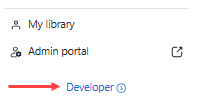
> **Developer link**
>
> The Marketplace only displays the **Developer** link when it detects that the user has the proper developer permissions. If you do not see it displayed, check with your admin that you have the correct permissions assigned.
>
- On the **Created apps** page, click **Develop** and select **Build an app**.
- On the app creation screen, select **General app** and click **Create**.
- Go to **Features** > **Access**, and go to the **Plugin SDK** section.
-
To download the SDK files, select the platform **Windows**. This page
displays available SDK versions for the selected platform, along with links
to their corresponding release notes.
- Finally, select the **Download** button.
If you **already have at least one registered app**, follow these steps to download the SDK files using your existing app.
- Use an account with developer permissions. Go to the [Zoom App Marketplace](https://marketplace.zoom.us/), and sign-in.
-
In the lower-left navigation pane, click **Developer**.

> **Developer link**
>
> The Marketplace only displays the **Developer** link when it detects that the user has the proper developer permissions. If you do not see it displayed, check with your admin that you have the correct permissions assigned.
>
- On the **Created apps** page, select your app to open its configuration pages.
- Go to **Features** > **Access**, and go to the **Plugin SDK** section.
-
To download the SDK files, select the platform **Windows**. This page
displays available SDK versions for the selected platform, along with links
to their corresponding release notes.
- Finally, select the **Download** button.