# Download and install the Plugin SDK for macOS
## Prerequisites
- You must have a developer account on the Zoom App Marketplace.
- Your app's users must be using Zoom Workplace client version 7.0.2 or higher.
- Minimum Xcode version 16.1.
## Download the Plugin SDK
If you **don't already have at least one registered app**, follow these steps to create an app and download the SDK files.
- Use an account with developer permissions. Go to the [Zoom App Marketplace](https://marketplace.zoom.us/), and sign-in.
-
In the lower-left navigation pane, click **Developer**.
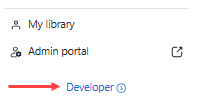
> **Developer link**
>
> The Marketplace only displays the **Developer** link when it detects that the user has the proper developer permissions. If you do not see it displayed, check with your admin that you have the correct permissions assigned.
>
- On the **Created apps** page, click **Develop** and select **Build an app**.
- On the app creation screen, select **General app** and click **Create**.
- Go to **Features** > **Access**, and go to the **Plugin SDK** section.
-
To download the SDK files, select the platform **macOS**. This page displays
available SDK versions for the selected platform, along with links to their
corresponding release notes.
- Finally, select the **Download** button.
If you **already have at least one registered app**, follow these steps to download the SDK files using your existing app.
- Use an account with developer permissions. Go to the [Zoom App Marketplace](https://marketplace.zoom.us/), and sign-in.
-
In the lower-left navigation pane, click **Developer**.

> **Developer link**
>
> The Marketplace only displays the **Developer** link when it detects that the user has the proper developer permissions. If you do not see it displayed, check with your admin that you have the correct permissions assigned.
>
- On the **Created apps** page, select your app to open its configuration pages.
- Go to **Features** > **Access**, and go to the **Plugin SDK** section.
-
To download the SDK files, select the platform **macOS**. This page displays
available SDK versions for the selected platform, along with links to their
corresponding release notes.
- Finally, select the **Download** button.