Use the custom UI
The code on this page only works with the custom UI.
Important See UI legal notices for Zoom legal notices and how to display them in your app.
Enable the custom meeting UI
To use the custom meeting UI, enable the feature before starting or joining a meeting.
ZoomSDK.getInstance().getMeetingSettingsHelper().setCustomizedMeetingUIEnabled(true);
To listen for In-Meeting events, register or
unregister the InMeetingServiceListener function:
InMeetingService mInMeetingService = ZoomSDK.getInstance().getInMeetingService();
//Register
mInMeetingService.addListener(this);
//Unregister
mInMeetingService.removeListener(this);
Create a custom meeting UI
Our customizable view is called MobileRTCVideoView. Implement the
MobileRTCVideoView function in the code layout. The Meeting SDK interface
uses the MobileRTCVideoView function as the video container.
<activity
    android:name="us.zoom.sdksample.inmeetingfunction.customizedmeetingui.MyMeetingActivity"
    android:configChanges="screenSize"
    android:theme="@style/ZMTheme.SubWindow"
    android:screenOrientation="portrait"/>
Note:
Do not include
MobileRTCVideoViewin a layout that will be inflated outside of a meeting. It is only meant to be used while in a meeting, so inflating it when not in a meeting may cause undesirable behavior.
Use the MobileRTCVideoView interface getVideoViewManager() to get
the manager object MobileRTCVideoViewManager for the video view.
mGalleryVideoView = (MobileRTCVideoView)mGallerySenceView.findViewById(R.id.galleryVideoView);
MobileRTCVideoViewManager mGalleryVideoViewMgr = mGalleryVideoView.getVideoViewManager();
Use the MobileRTCVideoViewManager function to add, remove, update, and
destroy the video unit in MobileRTCVideoView.
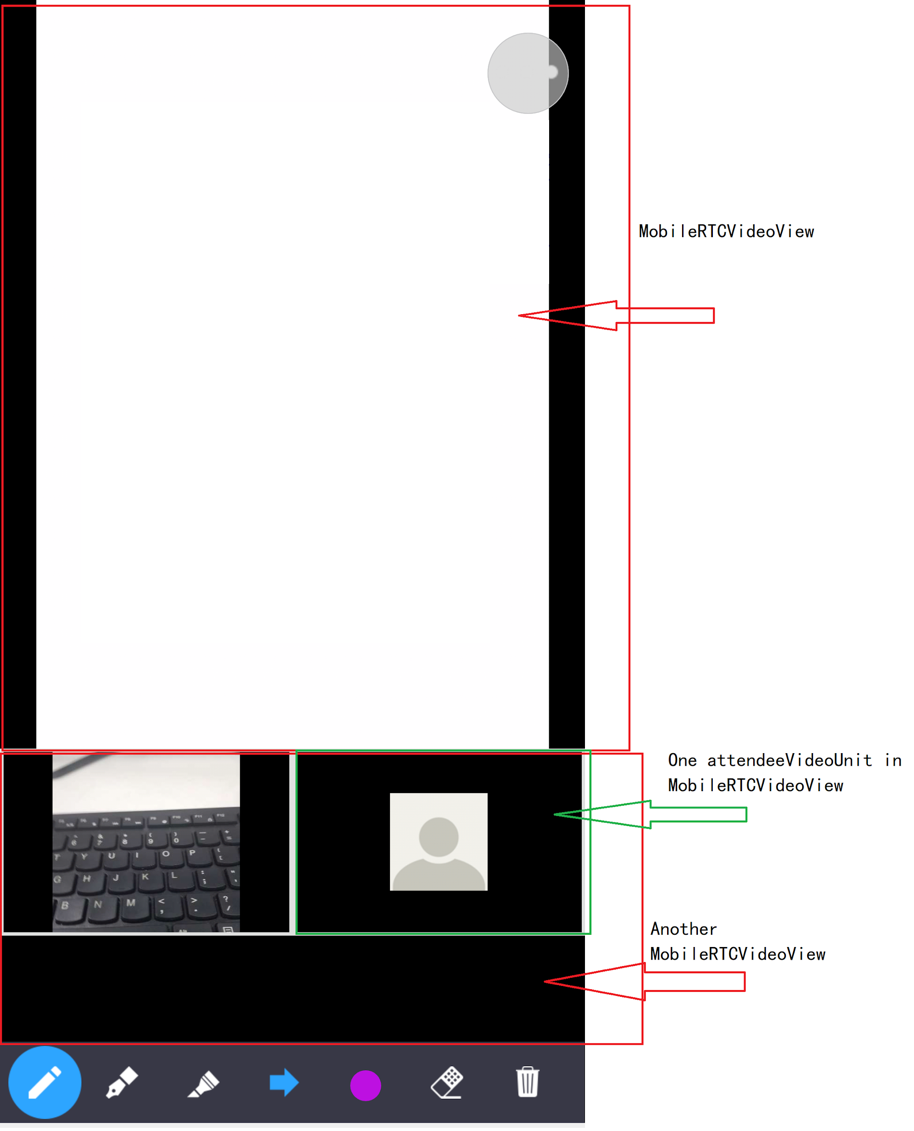
MobileRTC video view manager interfaces
| Modifier and Type | Method and Description |
|---|---|
| boolean | addActiveVideoUnit (MobileRTCVideoUnitRenderInfo renderInfo) - Add a active video unit in the VideoView. |
| boolean | addAttendeeVideoUnit (long user ID, MobileRTCVideoUnitRenderInfo renderInfo) - Add a attendee video unit on the VideoView. |
| boolean | addPreviewVideoUnit (MobileRTCVideoUnitRenderInfo renderInfo) - Add preview video unit in the VideoView. |
| boolean | addShareVideoUnit (long user ID, MobileRTCRenderInfo renderInfo) - Add a share video unit in the VideoView. |
| void | destroy () - Call this API to release resource, the VideoView will unable to add video unit. |
| void | removeActiveVideoUnit () - Remove active video unit in the VideoView. |
| void | removeAllAttendeeVideoUnit () - Remove all attendee video unit in the VideoView. |
| void | removeAllVideoUnits () - Remove all video units in the VideoView. |
| void | removeAttendeeVideoUnit (long user ID) - Remove a attendee video unit in the VideoView by user's ID. |
| void | removePreviewVideoUnit () - Remove preview video unit in the VideoView. |
| void | removeShareVideoUnit () - Remove share video unit in the VideoView. |
| void | updateActiveVideoUnit ( MobileRTCVideoUnitRenderInfo renderInfo) - Update active video unit render information on the VideoView. |
| void | updateAttendeeVideoUnit (long user ID, MobileRTCVideoUnitRenderInfo renderInfo) - Update a attendee video unit render information on the VideoView by user's ID. |
| void | updatePreviewVideoUnit ( MobileRTCVideoUnitRenderInfo renderInfo) - Update preview video unit render information on the VideoView. |
| void | updateShareVideoUnit ( MobileRTCRenderInfo renderInfo) - Update share video unit render information on the VideoView. |
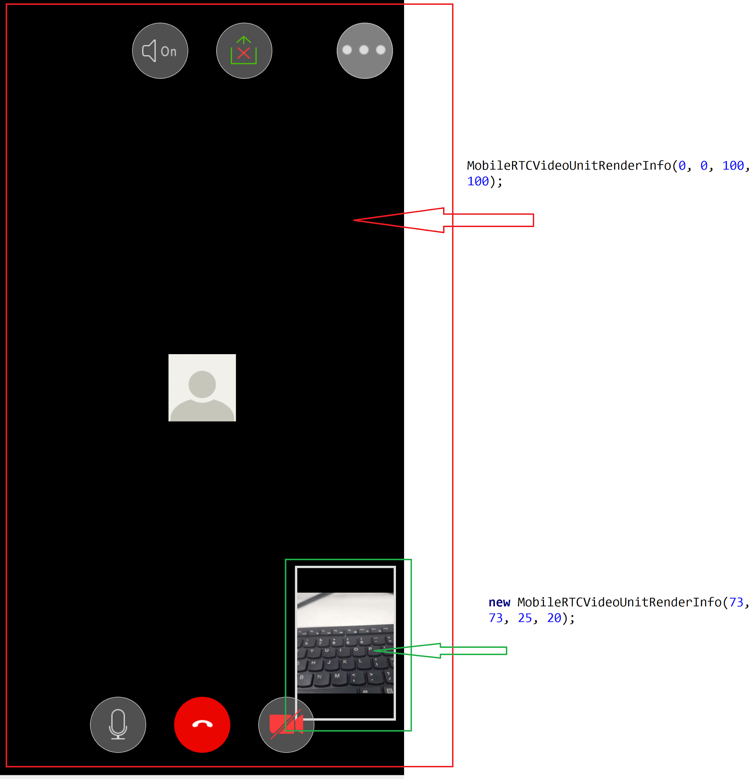
MobileRTCVideoUnitRenderInfo
| int | aspect_mode - Video unit aspect mode defined in the MobileRTCVideoUnitAspectMode class. Default is original. |
|---|---|
| int | background_color - Video unit background color. Default is black. |
| boolean | is_border_visible - Show video border on video unit. Default is false. |
| boolean | is_show_audio_off - Show user's audio status on video unit. Default is false. |
| boolean | is_username_visible - Show user's name on video unit. Default is false. |
We will cover details of those methods in later sections.