# Use the custom UI
> The code on this page only works with the **custom UI**.
> Important
> See [UI legal notices](/docs/meeting-sdk/ui-notices/) for Zoom legal notices and
> how to display them in your app.
## Enable the custom meeting UI
To use the custom meeting UI, enable the feature before starting or joining a meeting.
```java
ZoomSDK.getInstance().getMeetingSettingsHelper().setCustomizedMeetingUIEnabled(true);
```
To listen for In-Meeting events, register or
unregister the `InMeetingServiceListener` function:
```java
InMeetingService mInMeetingService = ZoomSDK.getInstance().getInMeetingService();
//Register
mInMeetingService.addListener(this);
//Unregister
mInMeetingService.removeListener(this);
```
## Create a custom meeting UI
Our customizable view is called `MobileRTCVideoView`. Implement the
`MobileRTCVideoView` function in the code layout. The Meeting SDK interface
uses the `MobileRTCVideoView` function as the video container.
```xml
```
> Note:
>
> Do not include `MobileRTCVideoView` in a layout that will be
> inflated outside of a meeting. It is only meant to be used while in a
> meeting, so inflating it when not in a meeting may cause undesirable
> behavior.
Use the `MobileRTCVideoView` interface `getVideoViewManager()` to get
the manager object `MobileRTCVideoViewManager` for the video view.
```java
mGalleryVideoView = (MobileRTCVideoView)mGallerySenceView.findViewById(R.id.galleryVideoView);
MobileRTCVideoViewManager mGalleryVideoViewMgr = mGalleryVideoView.getVideoViewManager();
```
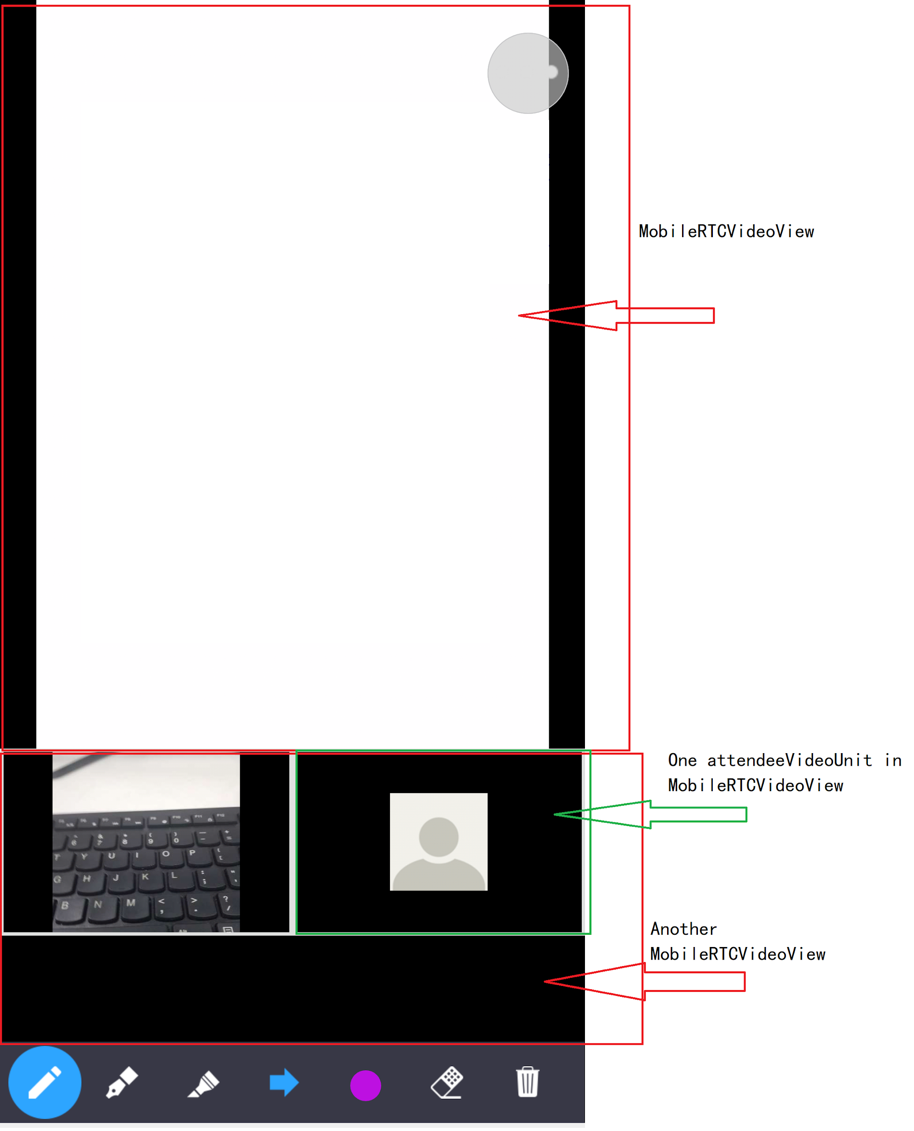
Use the `MobileRTCVideoViewManager` function to add, remove, update, and
destroy the video unit in `MobileRTCVideoView`.
### MobileRTC video view manager interfaces
| Modifier and Type | Method and Description |
| ----------------- | ---------------------------------------------------------------------------------------------------------------------------------------------------------------- |
| boolean | addActiveVideoUnit (MobileRTCVideoUnitRenderInfo renderInfo) - Add a active video unit in the VideoView. |
| boolean | addAttendeeVideoUnit (long user ID, MobileRTCVideoUnitRenderInfo renderInfo) - Add a attendee video unit on the VideoView. |
| boolean | addPreviewVideoUnit (MobileRTCVideoUnitRenderInfo renderInfo) - Add preview video unit in the VideoView. |
| boolean | addShareVideoUnit (long user ID, MobileRTCRenderInfo renderInfo) - Add a share video unit in the VideoView. |
| void | destroy () - Call this API to release resource, the VideoView will unable to add video unit. |
| void | removeActiveVideoUnit () - Remove active video unit in the VideoView. |
| void | removeAllAttendeeVideoUnit () - Remove all attendee video unit in the VideoView. |
| void | removeAllVideoUnits () - Remove all video units in the VideoView. |
| void | removeAttendeeVideoUnit (long user ID) - Remove a attendee video unit in the VideoView by user's ID. |
| void | removePreviewVideoUnit () - Remove preview video unit in the VideoView. |
| void | removeShareVideoUnit () - Remove share video unit in the VideoView. |
| void | updateActiveVideoUnit ( MobileRTCVideoUnitRenderInfo renderInfo) - Update active video unit render information on the VideoView. |
| void | updateAttendeeVideoUnit (long user ID, MobileRTCVideoUnitRenderInfo renderInfo) - Update a attendee video unit render information on the VideoView by user's ID. |
| void | updatePreviewVideoUnit ( MobileRTCVideoUnitRenderInfo renderInfo) - Update preview video unit render information on the VideoView. |
| void | updateShareVideoUnit ( MobileRTCRenderInfo renderInfo) - Update share video unit render information on the VideoView. |
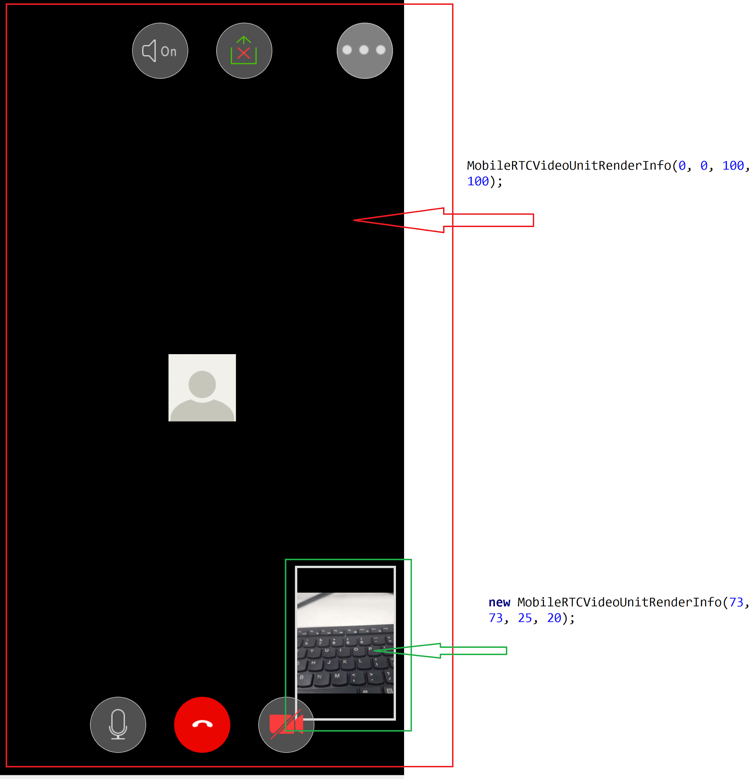
### MobileRTCVideoUnitRenderInfo
| int | `aspect_mode` - Video unit aspect mode defined in the `MobileRTCVideoUnitAspectMode` class. Default is original. |
| ------- | ---------------------------------------------------------------------------------------------------------------- |
| int | `background_color` - Video unit background color. Default is black. |
| boolean | `is_border_visible` - Show video border on video unit. Default is false. |
| boolean | `is_show_audio_off` - Show user's audio status on video unit. Default is false. |
| boolean | `is_username_visible` - Show user's name on video unit. Default is false. |
We will cover details of those methods in later sections.
---