Provisioning Testing
To facilitate your testing of provisioning for your monetized apps, we include five test licenses, which you can assign to users along with price plans. As the intention of provisioning testing is to confirm users are receiving the appropriate paid features in their respective price plans, we recommend testing all available plans.
Prerequisites
- You have created a user-managed general app.
- You have set up a monetization payment account.
- You have set up one or more pricing plans.
Procedure
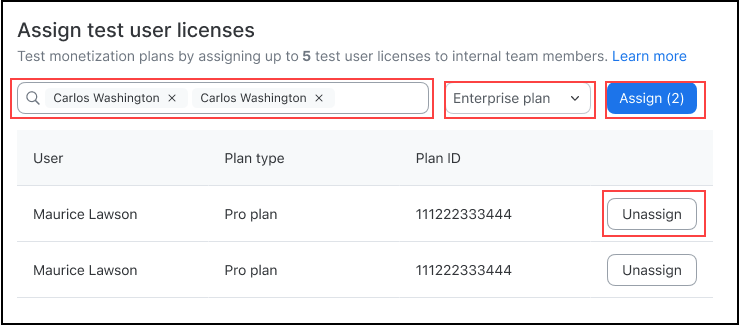
Log into the Zoom App Marketplace > Manage, and select your app. In your app's build-flow, go to Development > Local Test. In the Assign test user licenses section, you can:
- Assign up to 5 test users licenses.
- Search for internal team members to assign test licenses.
- Assign pricing plans to team members.
- Unassign test licenses to free up licenses for more testing.
To test that provisioning is taking place for the proper price plan:
- Assign a test license to a user.
- Have the user open the app. When the app initializes it calls the entitlements API to get the price plan associated with the test license assigned to the user. Based on these entitlements, your app provisions the associated paid plan features.
- To verify that the app is correctly provisioning the paid features, view the user entitlements data from the Get app user's entitlements API.