Controlling app access on the Marketplace
When publishing an app on the Marketplace, you may have a situation where you want to limit access to your app to a specific group of users, subscription tiers, or devices.
Prerequisite: You have read Key Concepts and understand the difference between admin-managed and user-managed apps.
There is no filter to limit who is able to search for your app. However, you can limit who is able to add your app by adding a landing page to your domain, then link that page to your app.
-
Log into Zoom App Marketplace as an admin account.
-
Open the build flow for your app, select Production at the top, and in the left navigation pane click App Listing.
-
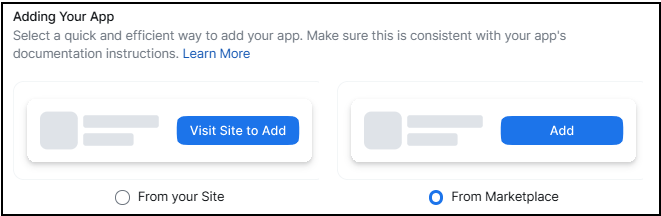
Select the App information tab and scroll down to Adding Your App.
-
Under Visit Site to Add, select From your site.
-
In the Direct landing URL field, enter the URL for your landing page on your domain.
-
Select Continue, and proceed with the steps to submit your app for publication.
Note
If the landing page you provide is a login page, only users with an existing account on your service can sign in and continue with app authorization.