Using WebSockets
The WebSocket protocol offers a full-duplex communication channel over a single TCP connection (see the WebSocket Protocol (rfc6455) for details). Zoom WebSocket events allow Developers to make a single, secured HTTP request to Zoom while keeping a single connection open to transmit all event data to the client subscribing to the event.
Zoom delivers events when the WebSocket connection is open. When the connection is closed, Zoom does not deliver events. Any events that occur when the connection is closed will not be delivered. Once the connection is open again, Zoom will deliver events that occurred after the connection was reopened.
See the WebSocket demo for a sample implementation:
Workplace
Business services
Accounts
Marketplace
Add WebSocket events
-
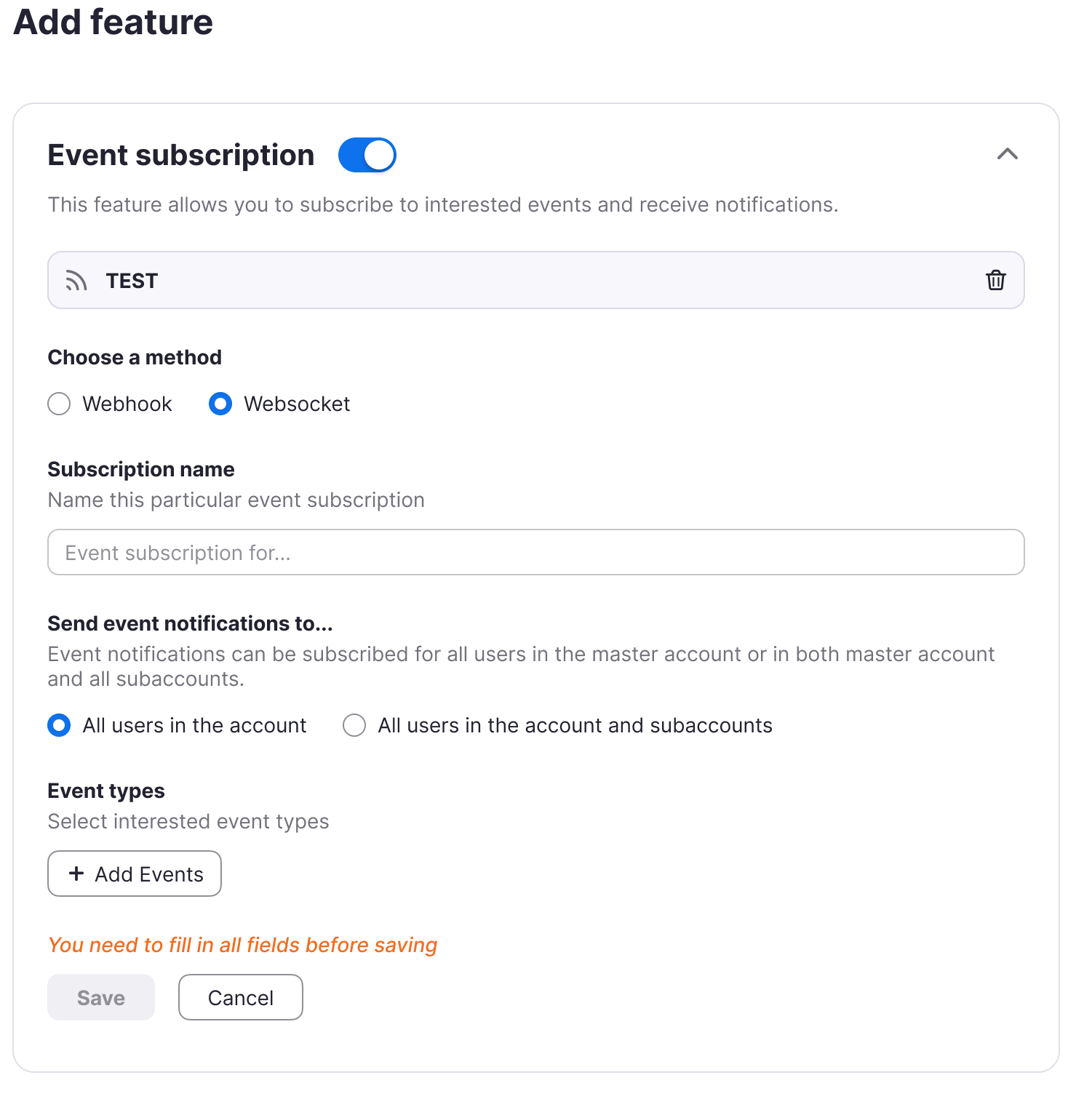
Go to the Feature section of your server-to-server OAuth or general app and toggle Event subscription to add an event.
-
Choose the WebSocket method.
-
Add a name for this event subscription.
-
(Master account only) If you have a master account with several sub-accounts, you can choose whether to send event notifications to All users in the account or All users in the account and subaccounts. If you don't have a master account, use the default, All users in the account.
-
Add the events that you'd like to send.
-
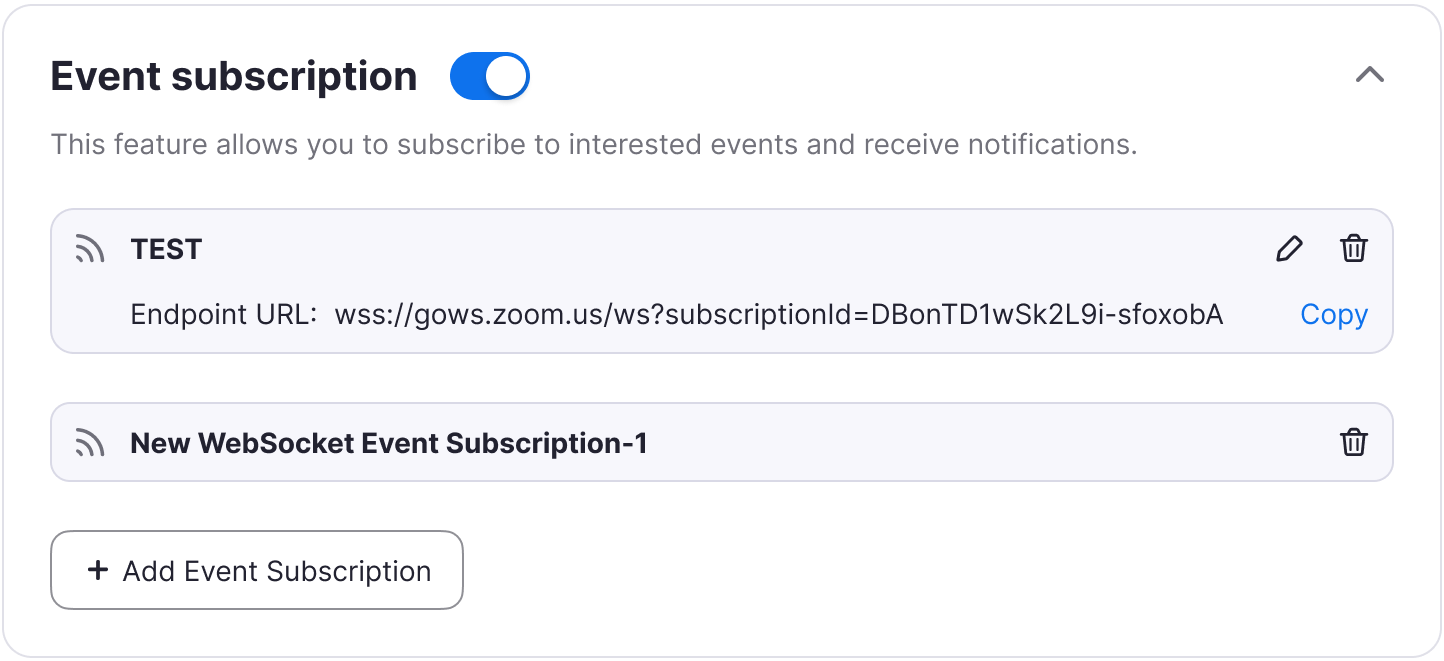
Click Save. You'll see the endpoint URL, which you can copy and use later (see Using WebSockets for details).
-
Click Continue.
Using WebSockets
Follow these steps to use WebSockets.
-
Get an access token. Server-to-server apps and general apps use the
client_credentialsgrant type.Use the
client_credentialsgrant type and provide your client ID and secret in exchange for your access token. You should Base64 encode your client ID and secret and put them in the authorization header.```shell curl -X POST -H 'Authorization: Basic Base64Encoder(clientId:clientSecret)' https://zoom.us/oauth/token?grant_type=client_credentials ```The response will be the access token, a bearer
token_typethat expires in an hour, with the scopes that you chose in your app settings screen:```json { "Access_token": String, "Token_type": "bearer", "Expire_in": long, "scope" : [String] } ``` -
Copy the WebSocket EndPoint URL from the Event subscription page in your app (see Add WebSocket events for details).
-
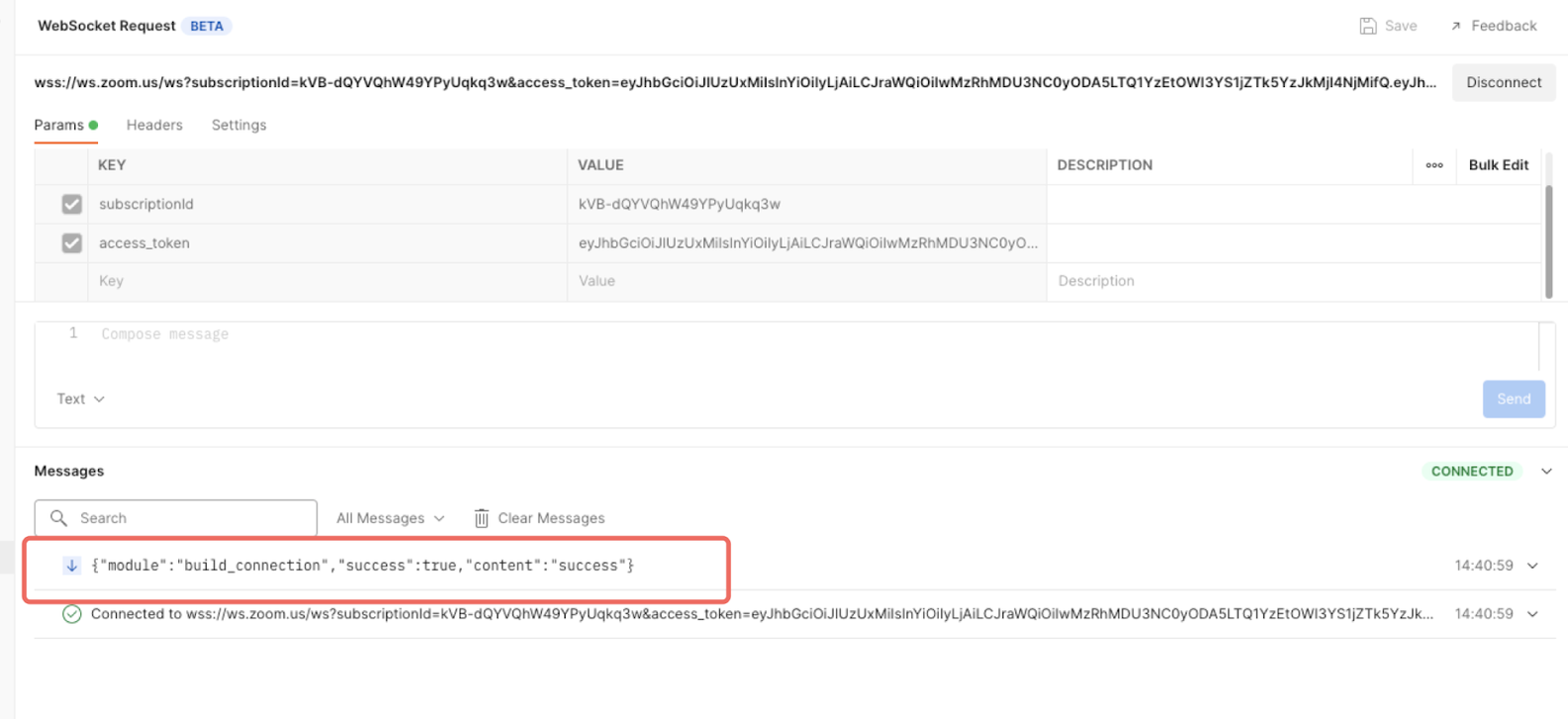
Append the access token to the end of this URL and use it to open a connection to the server:
wss://ws.zoom.us/ws?subscriptionId=ZhPGtK84QbapRWXzEBW7MA&access_token=access_tokenFor example, in Postman:
-
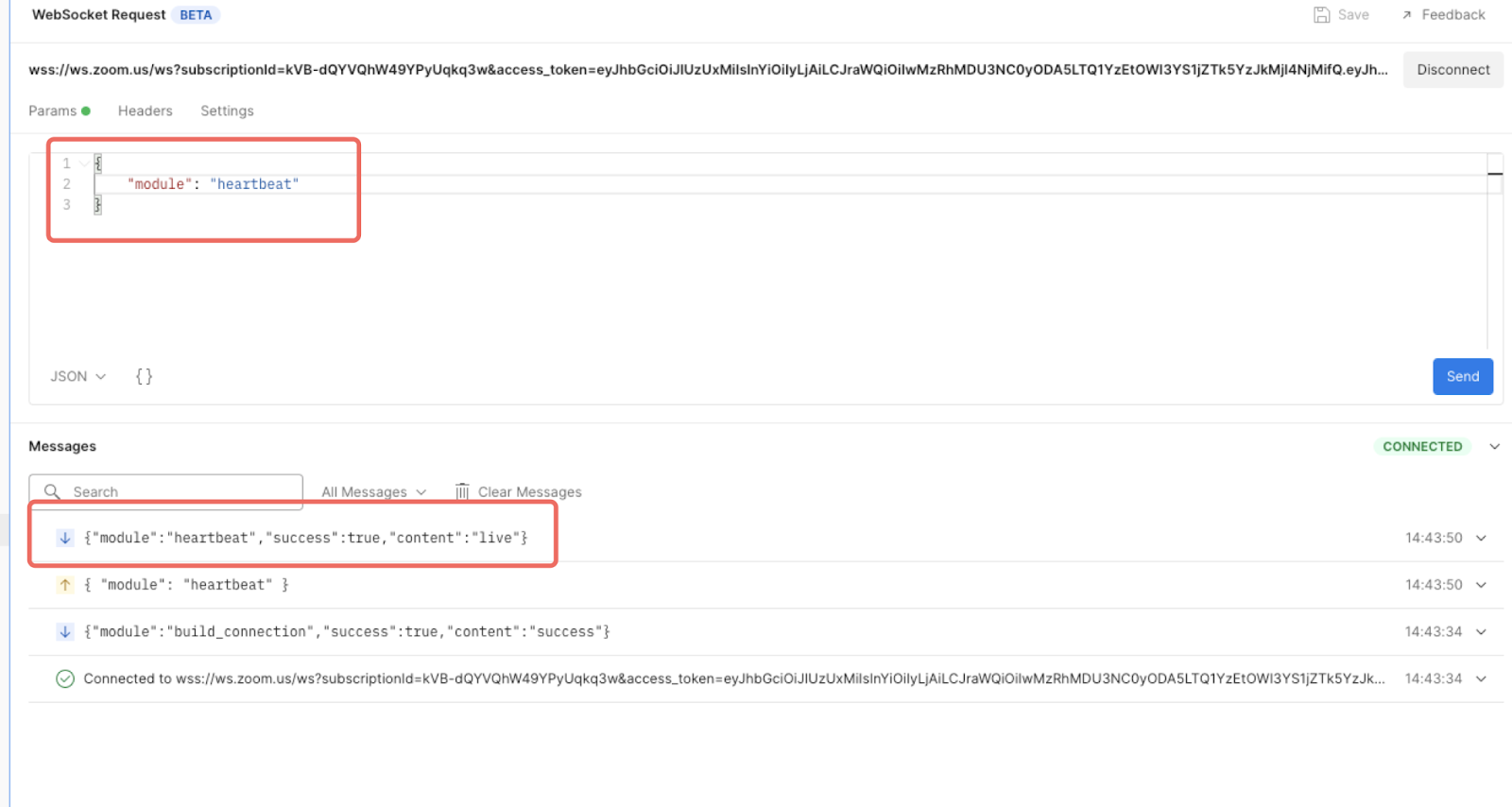
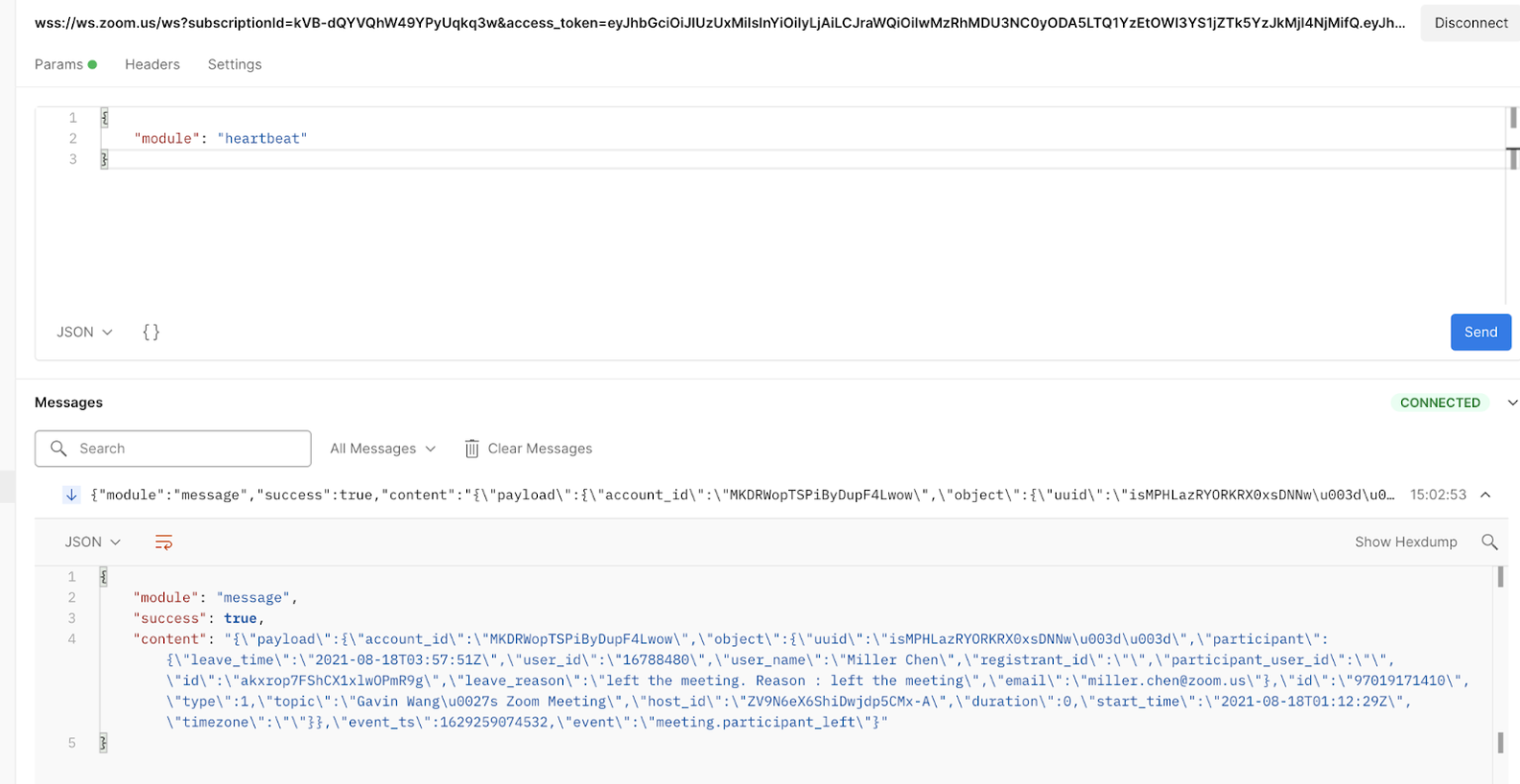
Send a heartbeat to the server every 30 seconds to keep the connection alive:
{
    "module": "heartbeat"
}
In Postman:
-
Trigger the event to receive a response through your open WebSocket. Depending on the event that you subscribed to, you can trigger it through API, Web, or the Zoom app.
In Postman:
WebSockets FAQ
Here are some common questions and answers about WebSockets.
What is a WebSocket?
The WebSocket protocol offers a full-duplex communication channel over a single TCP connection (see the WebSocket protocol (rfc6455) for details).
WebSocket events allow customers' developers to make a single, secured HTTP request to Zoom while keeping a single connection open to transmit all event data to the client subscribing to the event.
What is the difference between API calls, webhooks, and WebSockets?
Here are the descriptions of API calls, webhooks, and WebSockets that demonstrate the differences.
API calls
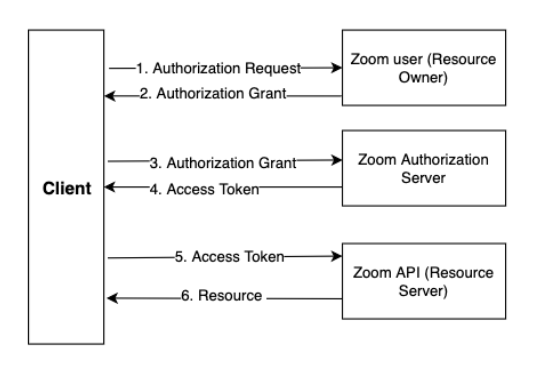
An API call is the process of a client application submitting a request to an API endpoint, the API server acting on that request, such as to retrieve data, and the server responding back to the client with a successful response that includes any data requested, or an error.
Webhooks
Webhooks are near real-time information about specific events in your Zoom account sent by Zoom via HTTP POST requests, one for each event. Event types include account events, app events, meeting events, and more. See Using Webhooks for details.
WebSockets
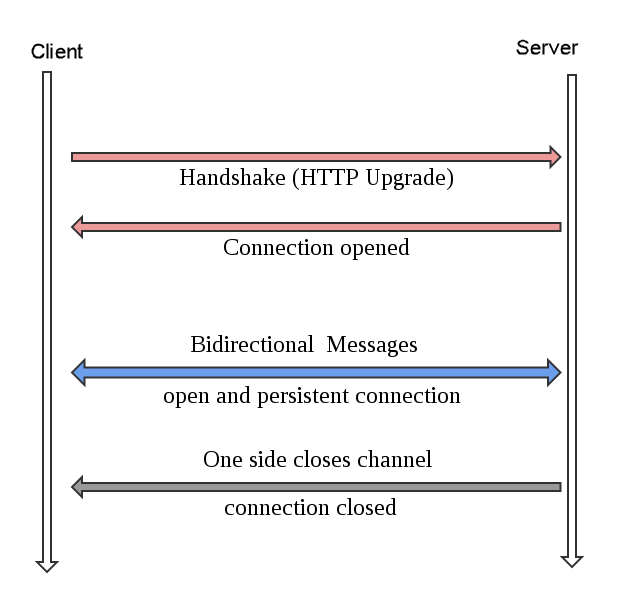
A WebSocket is a two-way interactive communication session between the user's browser and a server. When this communication channel is opened, you can send messages to a server and receive event-driven responses without having to poll the server for a reply.
Are WebSockets account level or user-managed?
Account level.
Can I use WebSockets outside of my Zoom Account?
No, WebSockets are "bound" to the account that creates them, and are not intended for multi-tenancy like Zoom Marketplace Apps.
What app types can I use with WebSockets?
Both Server-to-Server OAuth and general apps can use WebSockets.